Welcome to BAR - the Bay Area's premier saltwater hobbyists hub!
You are using an out of date browser. It may not display this or other websites correctly.
You should upgrade or use an alternative browser.
You should upgrade or use an alternative browser.



I think I'm in the minority here, but I prefer to shoot in raw, and adjust the white balance after importing the pics to my pc. I like to shoot with the lens as close to parallel to the tank glass as possible, and I turn off the flow in the tank so I can use a little slower shutter speed.

Guest
- Joined
- Mar 2, 2015
- Messages
- 4,004
Always shoot in raw if your camera supports it and you have a way to edit in raw.
But if you don't want to bother with having to fire up the computer to edit just to post a few pix, a filter definitely helps.
I've found tungsten correction filters to work best for me. A 85a filter gives the most color temp correction but doesn't take away all the blue.
Most natural to me. Since most coral are under at least a few feet of water and most of the red and some of the green are already filtered out so the light is predominantly in the blue end of the spectrum.
Probably why I like Kessil most. While shooting, I turn up as much white as I can and up the intensity (giving me max shutter speed, since the filter drops about 2 stops it really helps). I still shoot in raw with the filter since I will need to adjust less in software giving me less artifacts.
Sent from my iPhone using Tapatalk
But if you don't want to bother with having to fire up the computer to edit just to post a few pix, a filter definitely helps.
I've found tungsten correction filters to work best for me. A 85a filter gives the most color temp correction but doesn't take away all the blue.
Most natural to me. Since most coral are under at least a few feet of water and most of the red and some of the green are already filtered out so the light is predominantly in the blue end of the spectrum.
Probably why I like Kessil most. While shooting, I turn up as much white as I can and up the intensity (giving me max shutter speed, since the filter drops about 2 stops it really helps). I still shoot in raw with the filter since I will need to adjust less in software giving me less artifacts.
Sent from my iPhone using Tapatalk

Past President
- Joined
- Jun 3, 2016
- Messages
- 2,791
I finally grabbed my daughters Nikon DSLR and shot some pix. I think I was taking better pix with my iPhone and the cheap orange filter. But, I now found this thread and will shoot some in raw mode. Other than correcting white balance, what else should I adjust in post processing mode?
Sent from my iPad using Tapatalk
Sent from my iPad using Tapatalk

Guest
- Joined
- Feb 20, 2007
- Messages
- 5,071
Depends on the camera. No need to shoot wide open if you have a lens that has a wide aperture. Stop down as much as you need within the limits of your camera.
Take this shot for example. This is a full size shot, uncropped, shot at f/45 at ISO 6400. The camera can go beyond ISO 6400 but I didn't need the extra stops of light. The depth of field is very narrow since it's shot at 1:1 with a Raynox 250M in front of the lens. Shot at 10,000k kelvin as set in camera. Pearlberry polyps on the edge are lighter in colors than anywhere else on the coral.
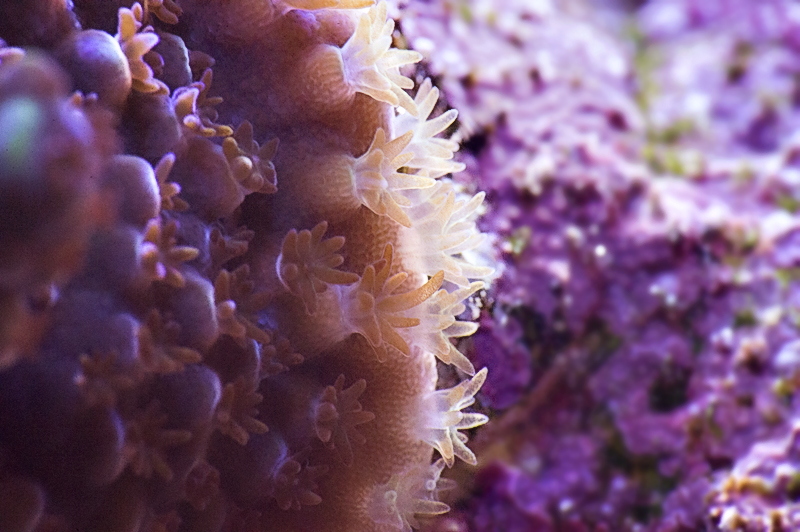
Take this shot for example. This is a full size shot, uncropped, shot at f/45 at ISO 6400. The camera can go beyond ISO 6400 but I didn't need the extra stops of light. The depth of field is very narrow since it's shot at 1:1 with a Raynox 250M in front of the lens. Shot at 10,000k kelvin as set in camera. Pearlberry polyps on the edge are lighter in colors than anywhere else on the coral.
Past President
- Joined
- Jun 3, 2016
- Messages
- 2,791
Wow.. that's a great shot! My camera goes up to ISO 3200, which is what I was trying to shoot at, but even then I was only able to stop down to f/8 or so which didn't give me much depth of field. Tomorrow I will turn my whites up on my Kessils to get more light which should help quite a bit.Depends on the camera. No need to shoot wide open if you have a lens that has a wide aperture. Stop down as much as you need within the limits of your camera.
Take this shot for example. This is a full size shot, uncropped, shot at f/45 at ISO 6400. The camera can go beyond ISO 6400 but I didn't need the extra stops of light. The depth of field is very narrow since it's shot at 1:1 with a Raynox 250M in front of the lens. Shot at 10,000k kelvin as set in camera. Pearlberry polyps on the edge are lighter in colors than anywhere else on the coral.

Supporting Member
- Joined
- Aug 29, 2016
- Messages
- 16,461
Depends on the camera. No need to shoot wide open if you have a lens that has a wide aperture. Stop down as much as you need within the limits of your camera.
Take this shot for example. This is a full size shot, uncropped, shot at f/45 at ISO 6400. The camera can go beyond ISO 6400 but I didn't need the extra stops of light. The depth of field is very narrow since it's shot at 1:1 with a Raynox 250M in front of the lens. Shot at 10,000k kelvin as set in camera. Pearlberry polyps on the edge are lighter in colors than anywhere else on the coral.
I mentioned wide open because that’s the only way to take advantage of the speed if they don’t have high iso
Sent from my iPhone using Tapatalk
Past President
- Joined
- Jun 3, 2016
- Messages
- 2,791
Thanks for the suggestions... great improvement so far, but still long way to go. So, it looks like I have to underexpose so that I don't blow out a bunch of pixels. I guess that's the limitation of the dynamic range compared to our eyeballs. The only thing I have done in the attached images are further correction of the white balance mostly by turning the blue down. What else can I do to improve these? The colors are much closer to real life, but still not there.
Settings:
Shooting in RAW
ISO 12,800
EV -1.0 to -2.0
f/25


Settings:
Shooting in RAW
ISO 12,800
EV -1.0 to -2.0
f/25
Guest
- Joined
- Feb 20, 2007
- Messages
- 5,071
Which Nikon are you shooting with? How do the pictures turn out if you shoot at ISO 1600, EV 0, f/8?
Light can be altered in 3 different ways in camera. ISO - higher you push it, the brighter the images get, but then you introduce noise and lose contrast. Shutter speed - lower you bring it down, the brighter the images get, but then you get motion blur and unsharp images if you can't handhold it steady enough. Aperture - the lower the number the brighter the images get, but you lose depth of field and then you're dealing with the limitation of the lens.
Light can be altered in 3 different ways in camera. ISO - higher you push it, the brighter the images get, but then you introduce noise and lose contrast. Shutter speed - lower you bring it down, the brighter the images get, but then you get motion blur and unsharp images if you can't handhold it steady enough. Aperture - the lower the number the brighter the images get, but you lose depth of field and then you're dealing with the limitation of the lens.


About Us
Welcome to BAR!
Bay Area Reefers (BAR) is a club for reef aquarists in the San Francisco Bay Area. The primary purpose of BAR is to promote, foster, and encourage education and appreciation for the ethical husbandry and propagation of marine life.
-The Board of Directors (BOD)
